Resize an image online — without uploading it
Set exact pixel dimensions, keep the aspect ratio, or pick a preset for Instagram, YouTube or a website hero. Your photo is resized on your own device, so the original never leaves your computer.
No sign-up. No watermark. No upload. Works offline once the page has loaded.
Why the upload step is the part worth skipping
Most “resize image online” sites work the same way: you pick a file, it is posted to their server, processed there, and offered back to you as a download link. That round trip costs you time on a slow connection, and it puts a copy of your photo on someone else’s disk — often with no stated retention period.
TheImage.app does the work with the same primitives your browser already exposes: the image is decoded into a canvas, scaled with a high-quality resampling filter, and encoded back into a file. Resizing a 12-megapixel photo takes a fraction of a second on a laptop and never touches the network. Bank statements, ID scans, client photos and family pictures stay where they belong.
How to resize an image in four steps
- Open the editor. Any current Chrome, Edge, Firefox or Safari build works.
- Add the image. Drag it onto the window, paste it, or use the file picker. The file is read locally.
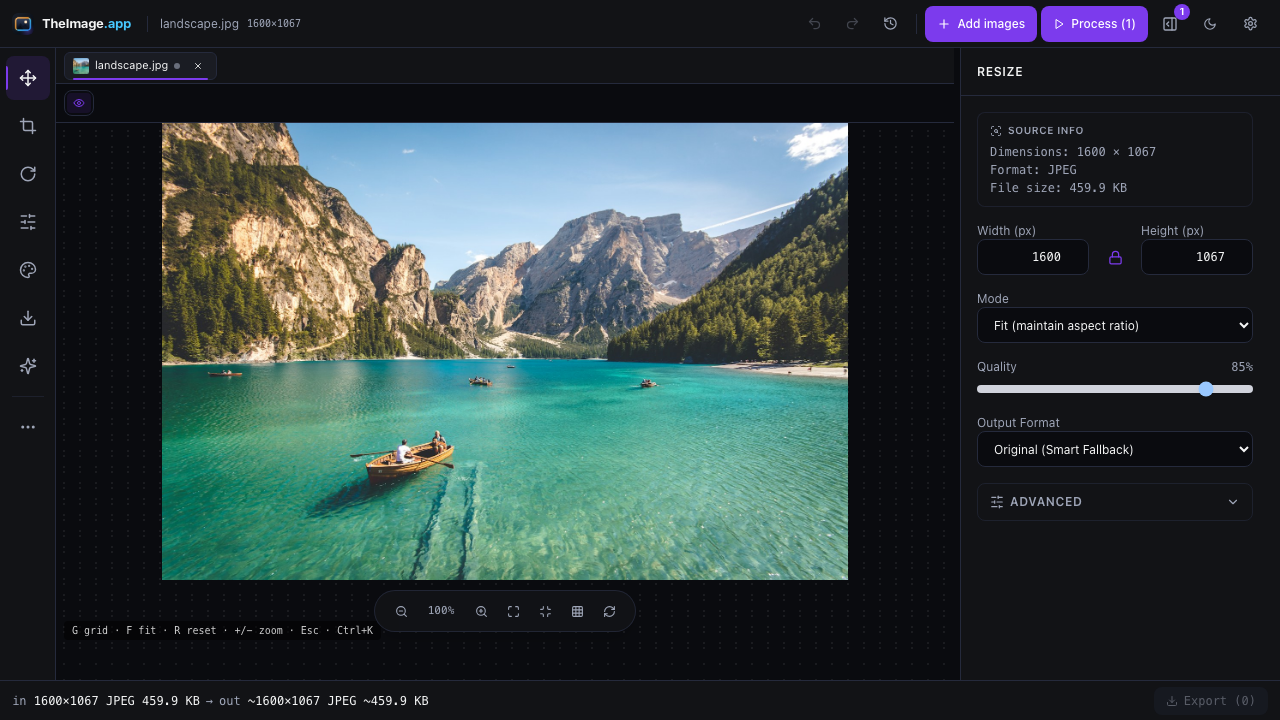
- Enter the size you need. Type a width in pixels and the height follows the original ratio, or switch the lock off to force an exact width × height. Percentage scaling and fit-inside-a-box are in the same panel.
- Export. Pick JPG, PNG, WebP or AVIF, set the quality, and save. For several files at once, add them to the queue and export the whole batch.
Common sizes, ready to type in
| Where it goes | Pixels |
|---|---|
| Instagram post (square) | 1080 × 1080 |
| Instagram portrait post | 1080 × 1350 |
| Instagram story or reel | 1080 × 1920 |
| YouTube thumbnail | 1280 × 720 |
| Open Graph / link preview | 1200 × 630 |
| X (Twitter) post image | 1600 × 900 |
| LinkedIn banner | 1584 × 396 |
| Favicon source | 512 × 512 |
These are the sizes the platforms document for uploads. They crop, so leave a little room around the subject.
Shrinking versus enlarging
Making an image smaller is a lossy operation you can repeat safely: the picture gets a new, smaller pixel grid and stays crisp. Making it larger is different. Every extra pixel has to be interpolated from its neighbours, so a 400 px file enlarged to 1600 px looks softer, not more detailed.
For bigger posters and print jobs, use the high-quality upscale path, which resamples with a sharper filter than the browser default and keeps edges cleaner. If you need genuinely new detail, the honest answer is a better original — see what upscaling can and cannot do.
Formats and limits
| Item | Free | Pro |
|---|---|---|
| Formats in | JPG, PNG, WebP, AVIF, SVG (HEIC and TIFF where your browser can decode them) | |
| Formats out | JPG, PNG, WebP, AVIF | |
| Max file size | 50 MB | 100 MB |
| Batch size | 20 images | 500 images |
| High-quality upscale | — | Included |
Questions people ask before their first resize
Does it upload my image anywhere?
No. Decoding, scaling and encoding all happen in the tab. You can open your browser's network panel and watch it stay silent while a photo is resized. The only requests the site makes are for its own code, fonts and metadata-free analytics events.
Can I resize several photos at once?
Yes — drop a folder's worth of files into the queue and apply one size to all of them. The free plan handles 20 images per batch; Pro handles 500.
Will the metadata (EXIF, GPS) be removed?
Yes. The export writes a new file containing only the visible pixels, so camera metadata and location tags are gone. That is usually what you want before posting a photo publicly.
Does it work offline?
Yes. Install the app once and it keeps working without a connection, which is useful on a plane, on site, or anywhere the Wi-Fi is worse than your laptop.
Is it really free?
The editor, the formats and 20-file batches are free with no account. Pro is an optional licence for larger files, bigger batches and the high-quality upscale filter.